


Migrating References
Migrate References: Uploading a new version with previous references
Sometimes you have a new version of a document that already have reference created, you can migrate existing references to keep your data intact without losing information to prevent duplicate work.
Please Note: Migrating references are based on mapping the X and Y coordinates of the references from previous versions to the newest version. Some discrepancy might occur if major changes were implemented between versions.
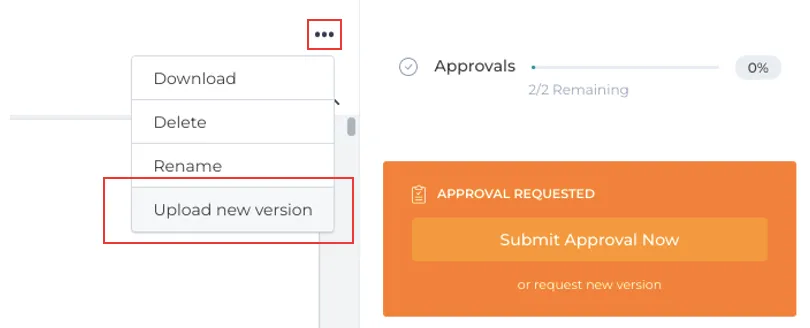
1. To transfer references from a previous version of a document to a new version, click on Upload new version under the three dot menu.
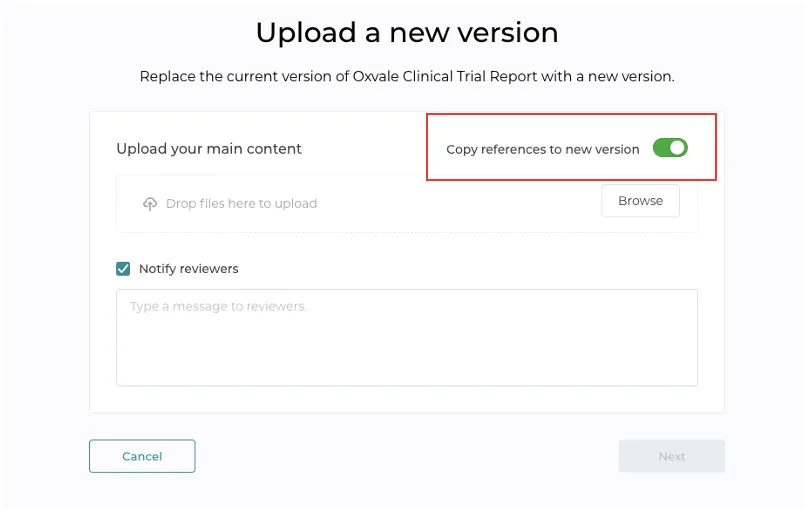
2. Switch the toggle that indicates “Copy references to new version” to green. Now when the new version is uploaded, all previous references will appear at the exact location.
Still have questions?
Chat
9am – 5pm Eastern Time, by clicking the icon in the bottom right corner of the screen.